
Create a bilingual style guide (free template) is a practical, end‑to‑end playbook for teams that publish in English and Arabic (or any EN↔AR pair). In this 2025 edition, you’ll learn how to define voice and tone, standardize terminology and transliteration, set punctuation and numerals policies, protect placeholders, and enforce consistency across web, app, email, and support channels. The article includes a downloadable‑ready template you can paste into your CMS or docs, plus governance tips so the guide stays alive—not a PDF no one reads.
Table of Contents
Who this guide is for and outcomes
This article is for content designers, translators, editors, localization engineers, PMs, and QA leads working across English and Arabic. After following it, you will:
- Publish a concise, actionable style guide that writers and translators actually use.
- Reduce rewrite churn by codifying decisions once (tone, terminology, numerals, punctuation).
- Prevent structural bugs by protecting placeholders, code, and mixed‑direction text.
- Deliver consistent voice across web, mobile, email, support, and legal content.
- Operate governance so updates are reviewed and versioned without bottlenecks.
Why a bilingual style guide matters (EN↔AR)
Without a guide, EN↔AR teams fight the same fires every release: inconsistent product names, wobbly punctuation, digits that change from screen to screen, and tone that shifts between formal and casual. A bilingual style guide captures one source of truth—short enough to read, specific enough to be useful, and testable so it drives real‑world quality.
The structure of a high‑leverage style guide
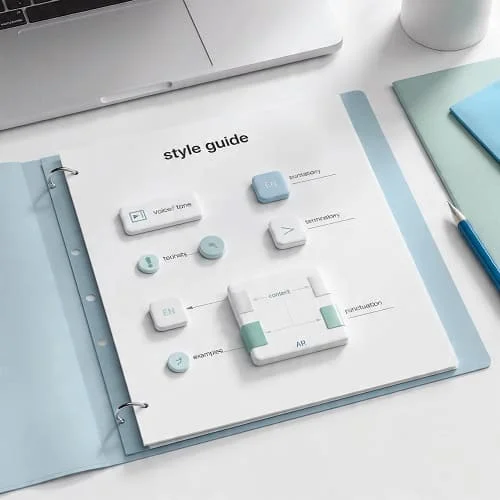
A practical guide fits on 5–10 pages and links to deeper references. Recommended sections:
- Voice and tone: brand pillars; when to be formal vs conversational.
- Terminology and naming: translation vs transliteration; brand and product names; capitalization rules in EN.
- Punctuation and quotes: comma, semicolon, quotes, ellipsis, dash—per language.
- Numbers and units: Arabic‑Indic vs Latin digits; grouping and decimals; date/time and calendars; currencies.
- UI strings: placeholders, variables, truncation, bidi isolation; verb style for CTAs.
- Inclusive and accessible language: plain language, gender neutrality where appropriate, reading level targets.
- Examples: pairs of DO/DON’T for recurring scenarios (error messages, emails, headings).
- Governance: ownership, change requests, approvals, versioning, and update cadence.
Voice and tone: bilingual rules with examples
Balancing tone across Arabic and English requires explicit choices. English often favors active, concise phrasing; Modern Standard Arabic (MSA) supports clarity and warmth when verbs are direct and nominal phrases are light.
- Brand voice: clear, helpful, respectful. Avoid slang in product UI; consider light colloquial only in marketing/social and keep it region‑aware.
- Register mapping: English “friendly” ≈ Arabic “مهذّب وواضح”—avoid gimmicky colloquialisms unless brand guidelines require.
- CTA style: EN uses imperative (“Start now”); AR often mirrors with a crisp verbal form (“ابدأ الآن”) rather than heavy nominalizations.
EN: We’ve sent a verification code to your phone.
AR: أرسلنا رمز التحقق إلى هاتفك.
Terminology and glossary: translation vs transliteration
Terminology is where consistency starts. Decide, document, and enforce:
- Product names and features: keep in English if they are brand marks, otherwise provide preferred Arabic and back‑translation.
- Technical terms: prefer established Arabic equivalents; if unavailable, choose a transliteration that reads naturally and document it with examples.
- Disambiguation notes: capture false friends and near‑cognates with usage examples to avoid drift.

| Term (EN) | Preferred AR | POS | Context | Don’t use | Notes |
| API       | واجهة برمجة التطبيقات | noun | Developer docs | "إيه بي آي" | Keep acronym in EN in code blocks |
| account   | حساب           | noun | UI labels | "أكونت" | Avoid colloquial transliterations |
| verify    | تحقّق / تأكّد | verb | Security prompts | تحقق من   | Choose one per surface and stick to it |
Punctuation, quotes, and spacing
Codify punctuation per language to avoid random switches within a page:
- Arabic: comma (،) and semicolon (؛); choose quotes (« » or “ ”) and stick to it; space around em‑dash equivalents is style‑dependent—be consistent.
- English: serial comma policy, quotation marks, and hyphen vs en‑dash vs em‑dash rules.
- Ellipsis: restrict to UX moments where truncation or suspense is needed; avoid in formal copy.
Numbers, dates, calendars, and currency
Pick a digits policy by surface, then apply it via your formatter—never manual string concatenation. For Arabic markets, also decide when to show Hijri alongside Gregorian and which currencies to render with symbols or ISO codes.
- Digits: Arabic‑Indic (٠١٢٣٤٥٦٧٨٩) for editorial; Latin (0123456789) for technical/logs; finance per regulation.
- Dates: long, medium, short formats; calendar toggle or dual display in KSA with Umm al‑Qura.
- Currency: symbol vs code, negative style (accounting parentheses), spacing and separators per locale.
For implementation details and code samples, see our dedicated guide: Localizing Dates, Numbers & Currency for Arabic.
UI strings, placeholders, and bidi safety
Structural errors derail trust faster than wording quirks. Protect variables, code, and mixed‑direction fragments:
- Do not translate placeholder names (
{user},%s). Enforce isolation:<bdi>,dir="auto", orunicode-bidi: isolate. - Keep button labels concise; avoid heavy nominalizations in Arabic; front verbs when possible.
- Test truncation and line breaks on narrow screens; Arabic strings can be longer than English.
Inclusive, accessible, and plain language
People read to complete tasks. Inclusive writing avoids stereotypes, supports assistive tech, and meets readability goals.
- Plain language: short sentences, concrete verbs, consistent person (2nd person in UI).
- Accessibility: link text is descriptive (no “click here”); avoid ASCII art or ambiguous emoji.
- Gender: in Arabic, avoid unnecessary gendered phrasing where context allows generic forms; in English, prefer gender‑neutral nouns where natural.
Free template: copy‑paste tables and JSON
Copy the tables below into your docs or a Google Sheet. They’re compact by design—teams actually fill them out.
1) Bilingual voice and tone
| Scenario        | EN tone & do | EN don’t | AR tone & do | AR don’t | Example pair |
| Onboarding CTA  | Use active verbs; short | Jargon | فعل مباشر، موجز | مبالغة/سجع | EN: Start now → AR: ابدأ الآن |
| Error message   | State issue + action | Humor | صِغ المشكلة والحل | اعتذار مبهم | EN: Try again → AR: حاول مرة أخرى |
2) Terminology entries (glossary)
| EN term | AR pref. | POS | Domain | Example | Notes |
| invoice | فاتورة | noun | Billing | EN: Download your invoice → AR: نزّل فاتورتك | Use noun consistently |
| refund  | استرداد | noun | Billing | Request a refund → طلب استرداد | Avoid تعويض unless legal context |
3) Numerals and dates policy
| Surface | Digits | Date format | Calendar | Currency style | Notes |
| Marketing site | Arabic‑Indic | Long | Gregorian | Symbol | Arabic quotes style |
| Dashboard      | Latin        | ISO+Short | Gregorian | Code | Align numbers, tabular fonts |
| KSA app        | Arabic‑Indic | Long+Medium | Dual (Umm al‑Qura + Greg.) | Symbol | Dual date display |
4) UI strings and placeholders
| Pattern | EN | AR | Notes |
| Count   | {count} new messages | {count} رسالة جديدة | Don’t translate {count}; isolate in RTL |
| CTA     | View details | عرض التفاصيل / اطّلع على التفاصيل | Pick one per product and standardize |
5) Governance workflow
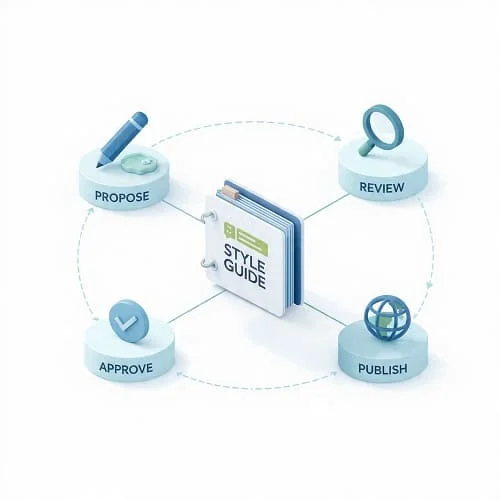
| Step    | Owner | SLA | Output |
| Propose | Writer/Translator | 2d | Change request with examples |
| Review  | Language lead     | 3d | Decision + rationale |
| Approve | Editorial council | 1d | Version bump |
| Publish | Doc owner         | 1d | Updated guide + changelog |
6) JSON scaffolding (for CMS/CAT integrations)
{
  "version": "2025.1",
  "voice": { "en": "clear, friendly, direct", "ar": "واضح، مهذّب، مباشر" },
  "digitsPolicy": {
    "marketing": "arab",
    "dashboard": "latn",
    "ksaPublic": "arab+dualCalendar"
  },
  "terminology": [
    { "en": "account", "ar": "حساب", "pos": "noun", "domain": "ui" },
    { "en": "verify", "ar": "تحقّق", "pos": "verb", "domain": "security" }
  ],
  "punctuation": { "arQuotes": "« »", "enSerialComma": true },
  "governance": { "owner": "Editorial", "updateCadence": "quarterly" }
}
Governance: ownership, updates, approvals
A style guide that never changes becomes noise. Keep governance lean:
- Owner: a named editor or language lead responsible for triage, not a committee.
- Update cadence: quarterly or per major release; publish changelog entries.
- Approvals: small council (2–3 reviewers) for high‑impact decisions only (brand names, numeral policy).
- Evidence: require examples of the problem and two realistic alternatives; pick one and move on.
Tooling: CAT, TMs, linting, and automation
Tools make the guide actionable:
- Expose the glossary to your CAT/TMS; prefer term QA that warns on “don’t use” forms.
- Lint strings for placeholders, bidi markers, and length. Fail builds on structural errors.
- Use visual regression for RTL/LTR views; pair snapshots with copy diffs.
- Measure adherence: sample content monthly, log fixes, and update the guide where friction persists.
Rollout: training, checklists, and measurement
A short training beats a long manual. Run a 45‑minute session with 10 examples, then share one‑page checklists:
- Author checklist: tone, terminology, numerals, punctuation, CTA style, placeholders preserved.
- Reviewer checklist: consistency vs the guide; fixes logged; issues added to backlog.
- QA checklist: truncation, bidi isolation, digits policy, dates/currency formatting.
Track two metrics: (1) percent of sampled content passing without edits; (2) time‑to‑publish per content type. Both should improve quarter over quarter.
Standards and trusted resources
- W3C Internationalization (I18N)
- Unicode CLDR: locale data
- Google Developer Style Guide
- Microsoft Globalization Style Guides
- GOV.UK Content Design: Style Guide
Related reading
FAQ
How long should a bilingual style guide be?
5–10 pages is ideal. Link out to deep dives (numerals, calendars, and currency) and keep the core rules tight so people read and apply them.
MSA or dialect?
For product UI, docs, and support: MSA is the scalable baseline. Consider dialect in social and brand campaigns only if your strategy requires it—and document where and how.
How do we stop terminology drift?
Keep the glossary small and high‑impact. Enforce with CAT term QA and code reviews for string changes. Reject “creative” alternates unless the council approves.
What about legacy content?
Don’t rewrite everything. Start with top‑traffic pages and critical flows; backfill over time with a “fix on touch” policy whenever content is edited.
How do we keep English and Arabic aligned?
Maintain side‑by‑side examples in the guide and add back‑translation fields for critical Arabic terms to confirm intent. Review high‑stakes changes in both directions.

Aarav Sharma — Founder & Editor, WA Translator. I publish hands‑on, privacy‑first guides on WhatsApp translation, iOS Shortcuts, and AI translators. All workflows are tested on real devices (EN↔AR) with screenshots and downloadable Shortcuts. About Aarav • Contact