

If you’re new to translation platforms and just want a clear path forward, this Beginner Guide to the Best AI Translation APIs for Developers is for you. We’ll explain how APIs like Google, DeepL, Azure, Amazon, and ModernMT actually work in real apps, how to compare cost and quality, when open-source or LLMs make sense, and how to avoid the pitfalls that trigger bugs, latency, or surprise bills. Expect practical examples with REST and JSON, realistic pricing math, and a vendor-neutral approach focused on your use case.
Table of Contents
What “Best” Means for Translation APIs in 2026
There’s no single winner for everyone. The best API is the one that balances quality, latency, cost, privacy, and developer ergonomics for your exact workload. Use these criteria:
- Format support: plain text, HTML with tags preserved, and document translation (DOCX, PPTX, PDF) if your workflow needs it.
- Language coverage and variants: do you need en-GB vs en-US, zh-CN vs zh-TW, or right-to-left languages?
- Quality + control: custom glossaries, formality/tone, domain adaptation, and consistent terminology.
- Performance and quotas: latency, streaming/batch options, and throughput under load.
- Pricing clarity: per-character vs per-request; discount tiers; steady-state vs burst.
- Privacy + compliance: data retention controls, encryption, regional endpoints.
- DX (Developer Experience): clean REST, SDKs, examples, error messages, and dashboards.
How Translation APIs Work (REST, Auth, JSON)
Most providers expose simple HTTPS endpoints. You send text in JSON, specify source and target languages, and receive a translated string or structured segments. Authentication is usually an API key or OAuth2 bearer token. A typical request looks like this:
Generic REST pattern (cURL)
curl -X POST https://api.provider.com/v1/translate \
  -H "Authorization: Bearer YOUR_API_KEY" \
  -H "Content-Type: application/json" \
  -d '{
    "q": ["Hello world", "Where is the station?" ],
    "source": "en",
    "target": "ja",
    "format": "text",
    "glossary": "glossary_id_optional"
  }'
Responses are JSON arrays with translated strings and sometimes confidence scores or detected language.
Common implementation details
- Batching: you can send multiple strings in one call (size limits apply). Good for throughput.
- HTML handling: many APIs accept
format=htmland preserve tags. Always test with lists/tables. - Rate limits: per minute or per 100 seconds. Use retries + exponential backoff and idempotency if provided.
- Glossaries: pass a glossary ID to enforce brand terms and do-not-translate (DNT) tokens.
API Profiles: Strengths, Limits, and Real Use Cases
This section summarizes the major options developers actually choose in 2026. The goal is not marketing—it’s to help you ship the right thing with fewer surprises.
Google Cloud Translation (Advanced)
Why devs pick it: broad language coverage, high reliability, and strong tooling for batch and document translation. The “Advanced” (v3) API supports glossaries and AutoML custom models if you need domain adaptation.
- Use cases: product catalogs, support articles, in-app content, backend pipelines with Cloud Storage.
- Formats: text, HTML, and Document Translation (DOCX, PPTX, PDF) via async jobs.
- Auth: OAuth2/Service Accounts; strong IAM integration if you’re already on GCP.
- Pros: scaling, language coverage, glossaries, stable SLAs, good docs.
- Watch-outs: costs can add up at scale; best results with a small pre/post-processing layer for HTML and PDFs.
Docs: Google Cloud Translation documentation.
DeepL API
Why devs pick it: highly natural phrasing for many European and popular Asian languages, clean API, formality control, and glossaries. Many teams love the output for customer-facing copy.
- Use cases: marketing pages, e-commerce UX strings, support replies that need “human-like” tone.
- Formats: text, HTML; document translation for DOCX/PPTX/PDF with solid layout preservation.
- Pros: style and fluency; per-sentence segmentation that usually preserves meaning.
- Watch-outs: language coverage narrower than Google/Azure; check retention settings for sensitive content.
Docs: DeepL API docs.
Microsoft Azure Translator
Why devs pick it: enterprise integration (Azure AD, Functions, Logic Apps), batch document translation through Blob Storage, and custom terminology (glossaries).
- Use cases: enterprise apps on Azure, knowledge bases, and workflows with Office files.
- Formats: text/HTML + document translation (async) with PDF/Office.
- Pros: governance, security posture, and good scale in Azure-native environments.
- Watch-outs: initial setup (keys, region, pricing meters) can be confusing for beginners.
Docs: Azure Translator documentation.
Amazon Translate
Why devs pick it: AWS-native option with Custom Terminology, S3-based batch, and integration with Textract/Comprehend for doc pipelines.
- Use cases: serverless translation jobs, content pipelines already in AWS, and UGC moderation/translation combos.
- Formats: text/HTML; batch with S3; pair with Textract for OCR of scans.
- Pros: easy to script at scale with Step Functions; stable costs in AWS orgs.
- Watch-outs: format fidelity depends on your pre/post steps; test with complex HTML.
Docs: Amazon Translate developer guide.
ModernMT (Adaptive MT)
Why devs pick it: adaptive engine that learns from your edits and translation memory in near real-time. Strong choice when you have ongoing content in a niche domain.
- Use cases: product docs, help centers, and apps with repetitive phrasing where “learning” cuts post-edit time.
- Pros: adaptive quality improvements; connectors with CAT/TMS tools.
- Watch-outs: get your terminology and memory organized; ensure privacy settings suit your data.
Docs: ModernMT documentation.
Open-source/on‑prem (NLLB‑200, Argos/LibreTranslate, etc.)
Why devs pick it: control and privacy. You can run models locally or via an inference API (e.g., Hugging Face). Good for research, internal tools, or strict data residency.
- Use cases: on‑prem translation where cloud is not allowed; cost control at massive scale if you can manage infrastructure.
- Pros: full control; can fine-tune; zero third-party retention.
- Watch-outs: infra complexity, model updates, maintenance cost; quality varies by language/domain.
See model cards like NLLB‑200 on Hugging Face to evaluate coverage and limitations.
LLMs for translation (when does it make sense?)
Large language models (LLMs) can translate reasonably well in context-rich scenarios or when you need style conditioning beyond glossaries (e.g., “translate like a friendly support agent”). Downsides: higher latency/cost, possible formatting drift, and inconsistent term control. For production UI strings and regulated content, classic MT APIs with glossaries usually win.
Pricing Logic: Model Your Costs Safely
Vendors typically bill per character (source characters), per million characters, or per page for document endpoints. Always mock up a month of traffic and build a margin.
Step‑by‑step modeling
- Estimate monthly characters: count your UI strings + avg length × monthly requests; add a buffer for spikes (20–30%).
- Check per‑million pricing in your region (varies by vendor).
- Include glossary lookups (no extra cost on most APIs) and document translation pages if used.
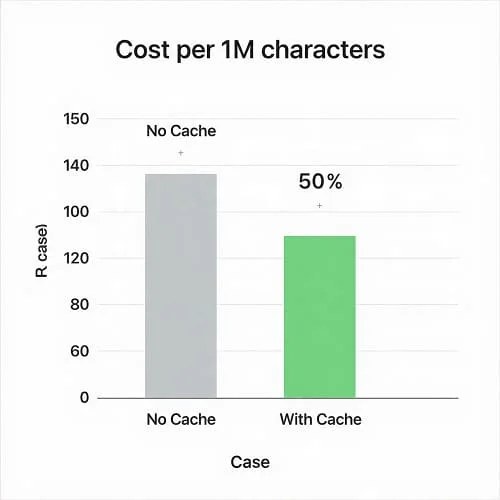
- Apply caching: identical sentences should not be re-translated—use a hash key.
| Scenario | Monthly characters | Notes |
|---|---|---|
| Web app UI + emails | 2–5 million | Heavy reuse; caching can cut cost by 50%+ |
| Knowledge base | 10–30 million (initial), then 1–3 million | Backfill once, then incremental updates |
| User-generated content | Highly variable | Rate limit + queue + caching are essential |
Quality in Practice: Glossaries, Domain Fit, and HTML
Translation quality isn’t a single number. Good production setups mix general MT with controls that enforce brand voice and consistency:
- Glossaries/terminology: define product names, controlled vocabulary, and DNT terms. DeepL, Google, Azure, and Amazon all support terminology features.
- Formality/tone: some APIs offer formality flags (e.g., DeepL:
formality=prefer_more). - HTML fidelity: pass
format=htmland protect code blocks, URLs, and placeholders with non-translatable tags. - Post-editing: for legal/medical or high-stakes content, plan a light human pass on titles, summaries, and UI critical strings.
If you need to translate hundreds of pages while preserving layout, consider a document-focused workflow. We cover that in detail here: Best AI Tools for Translating Large Files (2026).
Speed and Scale: Concurrency, Quotas, and Batch
APIs enforce quotas to protect infrastructure. Your code should be resilient under limits and network hiccups.
- Parallelism: send multiple requests concurrently but cap workers (e.g., 5–10 threads) to avoid throttling.
- Retries: exponential backoff on 429/503 with jitter; log correlation IDs for support.
- Batch endpoints: use async document translation for large files; stream progress where available.
- Queue: for UGC, buffer translations and process with a background worker; show “translating…” states to users.
Privacy, Security, and Compliance Basics
If you handle PII or regulated data, confirm the provider’s data handling:
- No retention options: disable training/data retention where offered.
- Encryption: TLS in transit, encryption at rest; private networking or VPC peering when available.
- Data residency: choose regional endpoints if required by policy.
- Audit: log who translated what and when; include hash keys, not raw content, where possible.
Reference Architecture: From Request to Cache
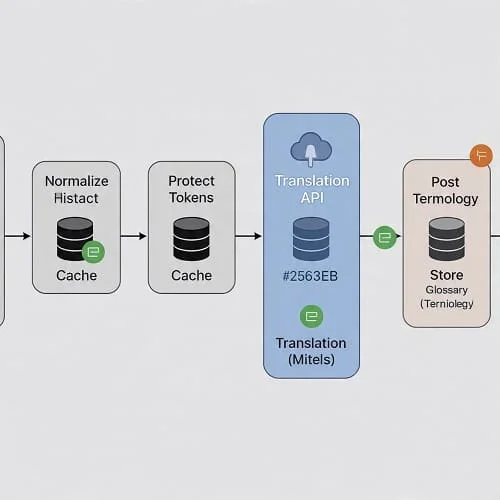
To keep costs predictable and responses fast, add a thin layer around any provider:
- Normalize: trim whitespace, unify quotes, lowercase keys.
- Protect tokens: wrap variables like
{name}or URLs in non-translatable placeholders. - Hash + cache: compute a key (e.g., SHA‑256 of text + src + tgt + glossary version). Check cache first.
- Translate: call provider; record cost/latency metrics.
- Post-process: unprotect tokens, tidy spaces/punctuation.
- Store: save to translation memory for reuse.
Code Examples: Detect → Translate → Handle Errors
Example: Minimal Node.js (fetch) pattern
import fetch from "node-fetch";

const API_URL = "https://api.example.com/v1/translate";
const API_KEY = process.env.TX_API_KEY;

function sleep(ms) { return new Promise(r => setTimeout(r, ms)); }

async function translateBatch(texts, source, target, glossaryId) {
  const body = { q: texts, source, target, format: "html", glossary: glossaryId };
  for (let attempt = 0; attempt < 5; attempt++) {
    const res = await fetch(API_URL, {
      method: "POST",
      headers: {
        "Authorization": `Bearer ${API_KEY}`,
        "Content-Type": "application/json"
      },
      body: JSON.stringify(body)
    });
    if (res.status === 429 || res.status === 503) {
      await sleep(300 * (attempt + 1) + Math.random() * 200);
      continue;
    }
    if (!res.ok) {
      const err = await res.text();
      throw new Error(`HTTP ${res.status}: ${err}`);
    }
    const data = await res.json();
    return data.translations;
  }
  throw new Error("Retries exhausted");
}

const sample = await translateBatch(
  ["<p>Welcome, {name}!</p>"],
  "en", "de", "brand-glossary-v2"
);
console.log(sample);
Example: Python with simple cache
import hashlib, json, os, time
import requests

API_KEY = os.environ.get("TX_API_KEY")
API_URL = "https://api.example.com/v1/translate"
CACHE = {}

def key_for(text, src, tgt, gloss):
    raw = f"{text}|{src}|{tgt}|{gloss or ''}"
    return hashlib.sha256(raw.encode("utf-8")).hexdigest()

def translate(text, src, tgt, gloss=None):
    k = key_for(text, src, tgt, gloss)
    if k in CACHE:
        return CACHE[k]
    payload = {"q": [text], "source": src, "target": tgt, "format": "text", "glossary": gloss}
    for attempt in range(5):
        r = requests.post(API_URL,
                          headers={"Authorization": f"Bearer {API_KEY}",
                                   "Content-Type": "application/json"},
                          data=json.dumps(payload), timeout=20)
        if r.status_code in (429, 503):
            time.sleep(0.3 * (attempt + 1))
            continue
        r.raise_for_status()
        out = r.json()["translations"][0]
        CACHE[k] = out
        return out
    raise RuntimeError("Retries exhausted")

print(translate("Hello, world!", "en", "es"))
Example: Glossary CSV format
source,target
"DeviceGuide","DeviceGuide"   # do-not-translate
"Sign in","Anmelden"
"Account","Konto"
Upload and reference this glossary by ID in your requests. Keep a version tag in the cache key so updates propagate.
Troubleshooting: Common Errors and Real Fixes
Error: “language not supported”
- Check ISO codes and regional variants (
pt-BRvspt-PT,zh-Hansvszh-Hant). - Fall back to base language if regional is unavailable, then post-edit region-specific phrases.
Error: HTML mangled or broken tags
- Send
format=html; wrap code, placeholders, and URLs with<span translate="no">or provider-specific tags. - Lint after translation: ensure tag balance and escape entities as needed.
Error: Cost spike
- Enable cache; deduplicate sentences; translate only diffs between versions.
- Batch strings; avoid per-sentence calls for highly repetitive content.
Error: Latency under load
- Increase parallel workers up to the rate limit; use region endpoints closer to users.
- Queue jobs; send notifications when translations are ready instead of blocking UI.
Error: Confidential content policies
- Use “no data retention” modes if offered; restrict access with IAM; consider on‑prem or open-source for the most sensitive text.
Decision Flow: Pick the Right API for Your App
- Marketing/UX text in major European + popular Asian languages, tone matters: Start with DeepL. Add glossaries and formality.
- Broad coverage, backend pipelines, async doc translation: Google Cloud Translation Advanced (or Azure Translator if you’re Azure‑first).
- AWS‑native workflows and S3 batch: Amazon Translate (pair with Textract for scanned PDFs).
- Ongoing domain content that “learns” from edits: ModernMT (adaptive).
- Strict privacy/on‑prem: open-source (NLLB‑200 or similar) with an inference server—accept infra overhead.
- Rich style conditioning beyond glossaries: consider LLMs for selective passages, but keep UI strings on classic MT.
FAQ
Should I translate on the client or server?
Server. Keep keys secret, apply caching, and centralize glossary control. Client-side calls risk key exposure and inconsistent results.
How do I preserve placeholders like {name}?
Wrap them in no-translate spans or use provider placeholders (<ph id="name">{name}</ph> style). Validate placeholders after translation.
What about SEO?
MT is fine for many pages, but run a human pass on high-value landing pages. Use hreflang tags, translated slugs, and locale-aware sitemaps.
Can I mix providers?
Yes. Many teams use a “quality-first” provider for customer-facing text and a cheaper option for internal docs, or route by language/domain.
How do I handle documents?
Use document translation endpoints (Google/Azure/DeepL/Amazon) for layout fidelity and async processing. For detailed workflows, see Best AI Tools for Translating Large Files (2026).
Trusted References
- Google Cloud Translation docs
- DeepL API documentation
- Azure Translator documentation
- Amazon Translate developer guide
- ModernMT docs
- Hugging Face: NLLB‑200 model card

Aarav Sharma — Founder & Editor, WA Translator. I publish hands‑on, privacy‑first guides on WhatsApp translation, iOS Shortcuts, and AI translators. All workflows are tested on real devices (EN↔AR) with screenshots and downloadable Shortcuts. About Aarav • Contact